Your Business Schedule in One Place
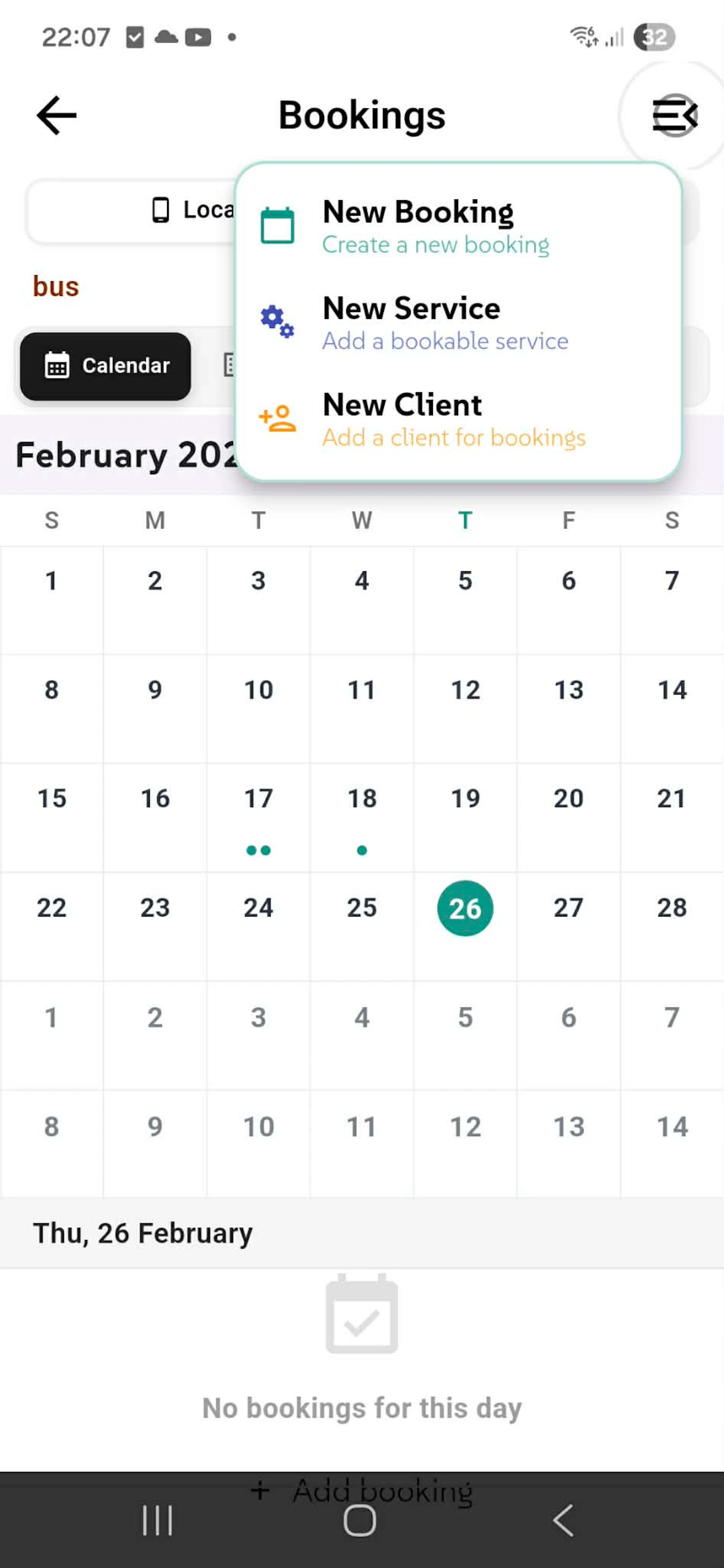
BookingsStop juggling spreadsheets. Your complete booking schedule in one beautiful calendar. See every appointment, spot free slots instantly, never double-book again. One tap shows what's booked. Speed matters.
Why Users Love This
Visual Clarity - See your whole month. Free days pop out. Busy days crystal clear.
One-Tap Actions - Create bookings, add services, register clients. No menu diving.
Zero Conflicts - Impossible to double-book. See what's scheduled before committing.
Offline Ready - Bookings stay on your device. No internet needed. Always in your pocket.
How to Use It
Tap any date → See all bookings. Want to add more? Hit the menu → Create booking, add service, or register client. Schedule updates instantly.
Build Your Service Catalog in Minutes
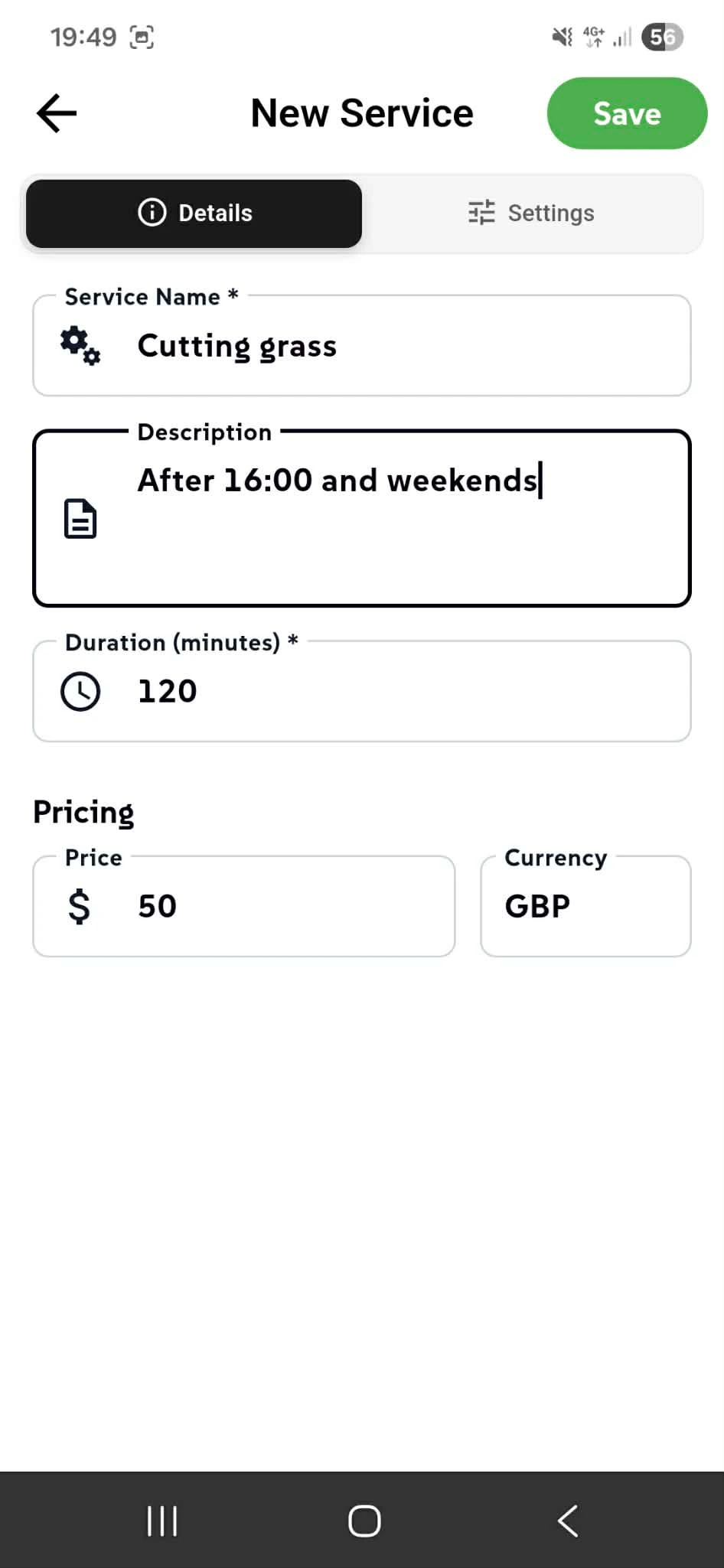
Define a new service tailored to your exact business offering. Add a service name, write a description to specify availability and requirements—like "After 16:00 and weekends"—then set the duration in minutes so clients know exactly what they're booking. Choose your pricing in any currency and assign a distinctive color to instantly identify services on your calendar. Every service is independent, organized securely on your device, keeping your pricing rules and availability private. Whether you're offering 15-minute consultations, 2-hour projects, weekend-only bookings, or premium services at custom rates, each service stores complete operational details. One save, and it's ready to book. No templates. No limits.
Why Services Matter Speed to Revenue - Set price, duration, and color. Clients book instantly.
Crystal Clear - Every service shows its own timeline, cost, and rules. No confusion.
Flexible Pricing - One service at $50 GBP, another at $100. Your business, your rates.
Calendar Identity - Each service gets its own color. Spot what's booked at a glance.
Settings Tab for Power Users - Fine-tune advanced options when you need them.
Manage Your Complete Service Catalog
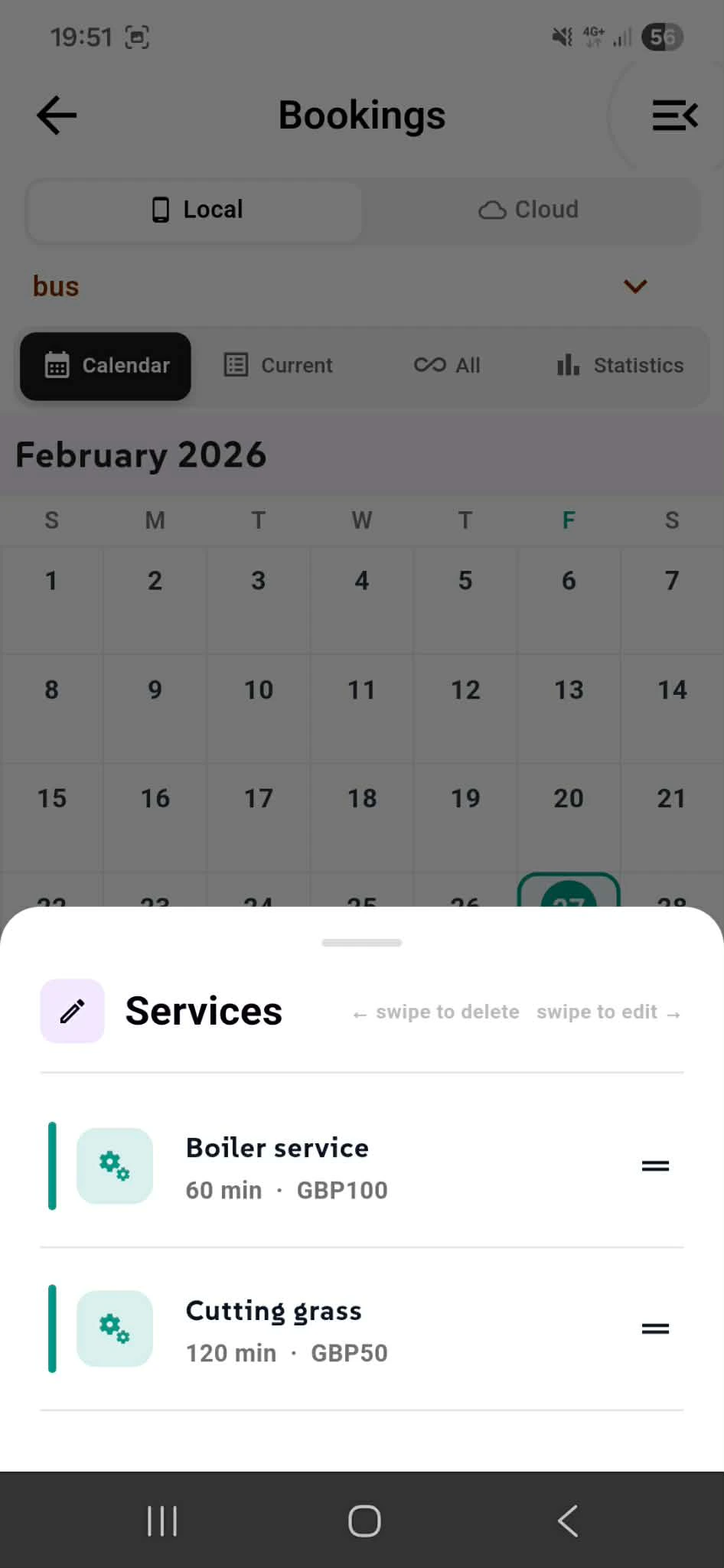
View all existing services in one place—every service name, duration in minutes, and pricing in your chosen currency. Each service displays its distinctive color for instant visual recognition on your calendar. Tap any service to edit details, adjust pricing, modify duration, or update descriptions without losing a beat. Swipe to delete services you no longer offer.
⚠️ Important: Deleting a service removes all associated bookings for that service. This action is permanent and cannot be undone. Make sure you're ready before removing a service from your catalog.
Why This Matters Full Control - Edit or remove services anytime. Your catalog evolves with your business.
Transparency - See exactly what each service costs and how long it takes at a glance.
Color-Coded Management - Green services, teal services, blue services—organize visually however makes sense for you.
Protect Your Data - Know what happens before you delete. No surprises.
Efficiency - Manage your entire service lineup without leaving the screen.
Your services are your revenue streams. Protect them. Edit them. Own them. Services Management.
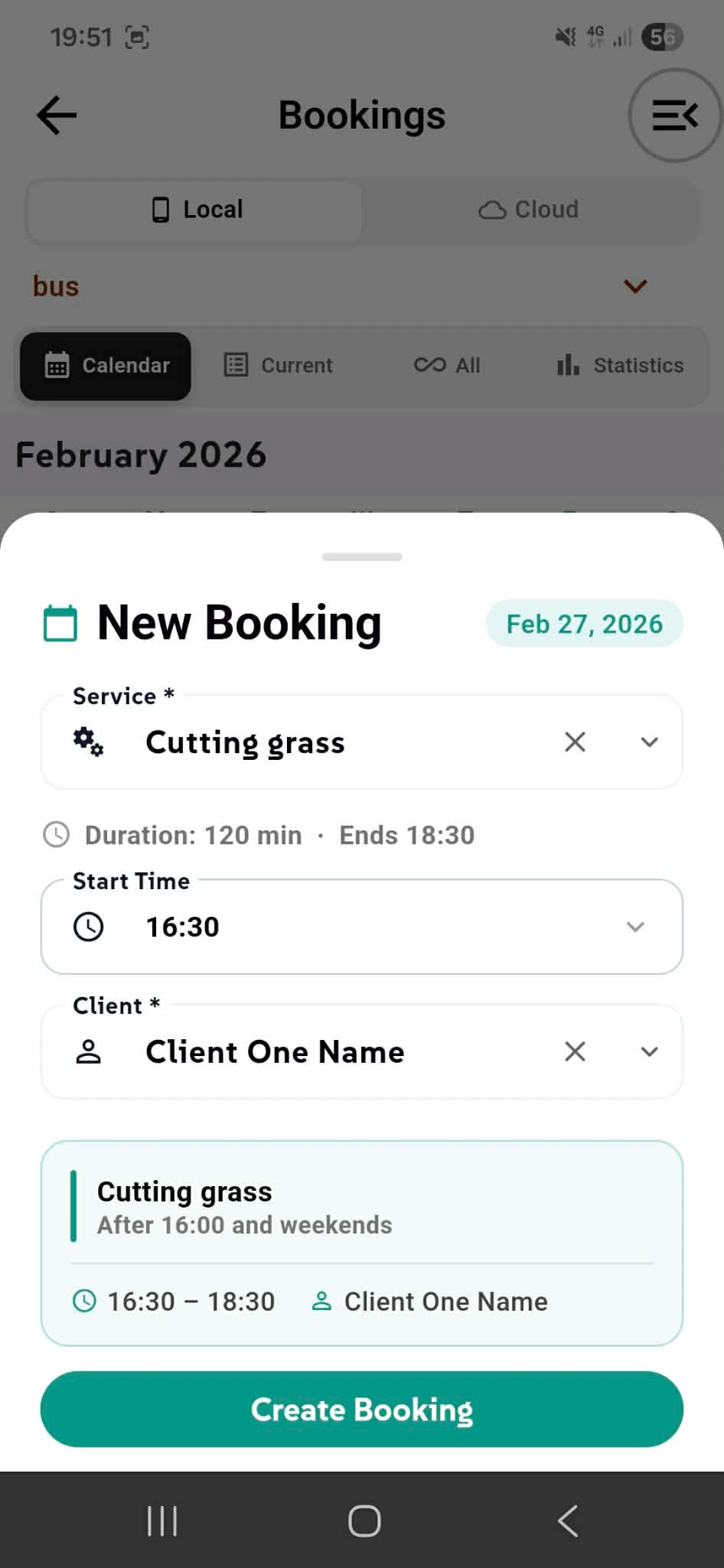
Lock In Your Booking in Seconds
Create a new booking with three fields. Select your service—shows duration and automatic end time. The system calculates when your 120-minute service ends based on start time. Pick your start time with an intuitive time picker, then select your client. Below, see a booking preview with service name, availability rules, exact time slot, and client confirmation. Everything is organized independently on your device, keeping your booking records secure. One tap on Create Booking and it's locked in. No double-books.
Why This Flow Works Three Taps, One Booking - Service, time, client. Done.
Smart Auto-Calculation - Duration + start time = exact end time.
Live Preview - See exactly what you're booking before you commit.
Time Picker Speed - Scroll, not type. Faster bookings.
Zero Friction - Two taps on calendar opens this. Total control. New Booking.
Pick Your Time in One Spin
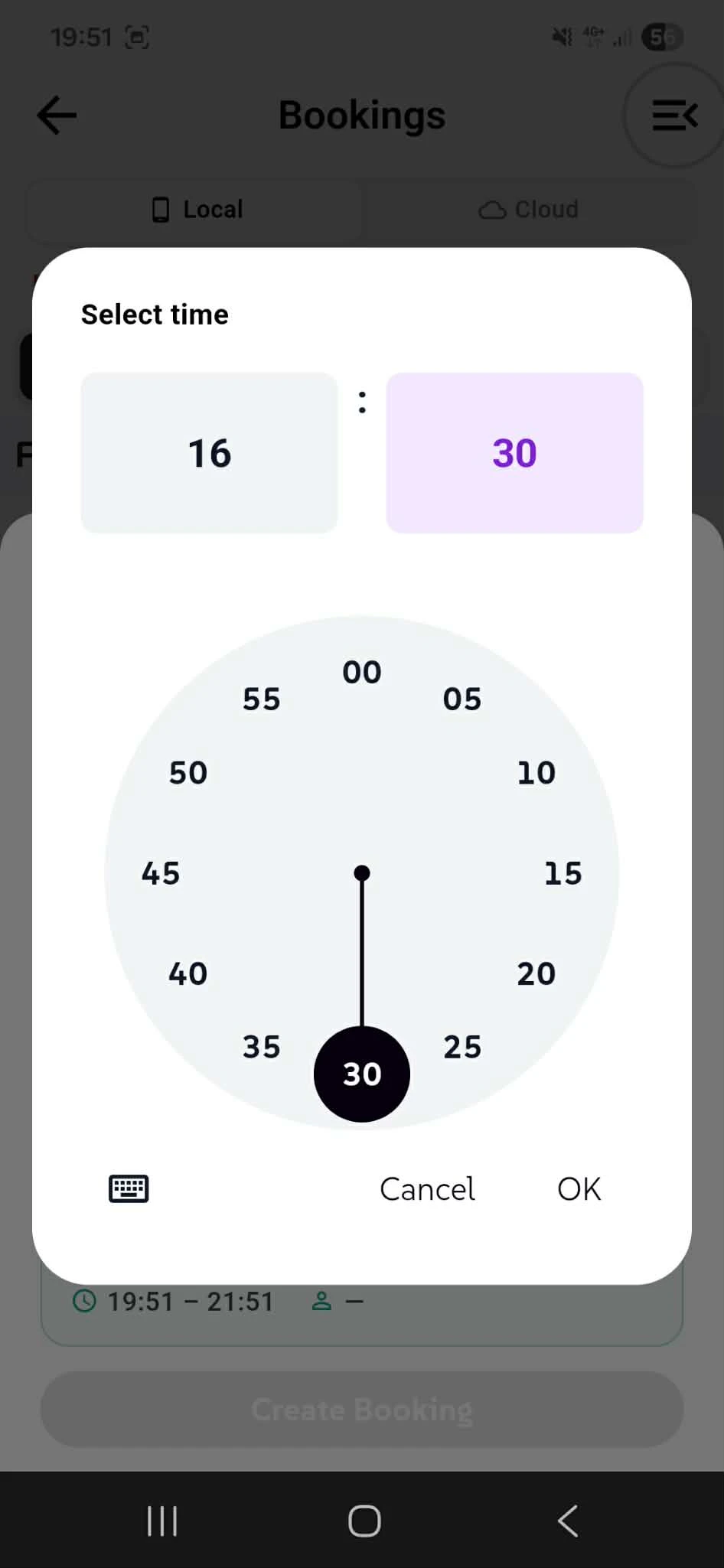
Select your start time with a visual clock picker. Drag the needle to your hour and minute, watch the time update in the display above, then tap OK. No typing. No confusion. Just intuitive time selection.
Why It Works Visual & Fast - See the dial, adjust instantly.
Precise Control - Spin to exact hour and minute.
Mobile-Friendly - Touch-based, not keyboard-based.
One spin. Perfect time. Time Picker.
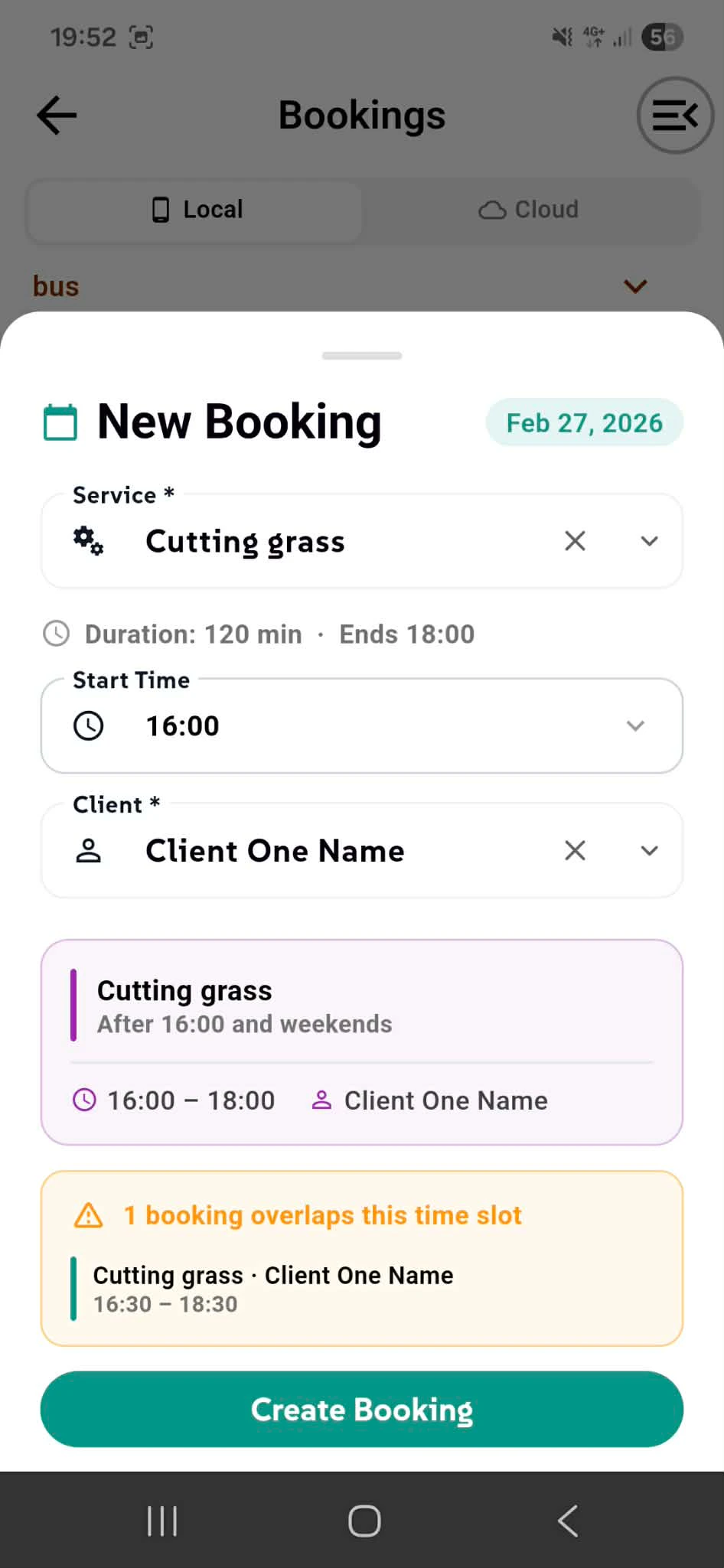
Smart Conflict Detection - You Stay in Control
Creating a new booking shows real-time conflict warnings. If your selected time overlaps with an existing booking, you'll see a yellow alert displaying the conflicting service, client, and exact time slot. The system warns but doesn't block—you decide what to do. Need to double-book? Go ahead. Need to reschedule? Cancel and pick a new time. The choice is yours. This is your business, your rules.
Why Transparency Matters See Conflicts Instantly - Know before you commit. No surprises.
Make Informed Decisions - If overlap is intentional, you can proceed anyway.
Stay in Control - App advises, you decide. You own your schedule.
No Hidden Bookings - Every overlap is visible. Every conflict is flagged.
Book with confidence. Or book anyway. Your call. Conflict Detection.
Today's Schedule at Your Fingertips
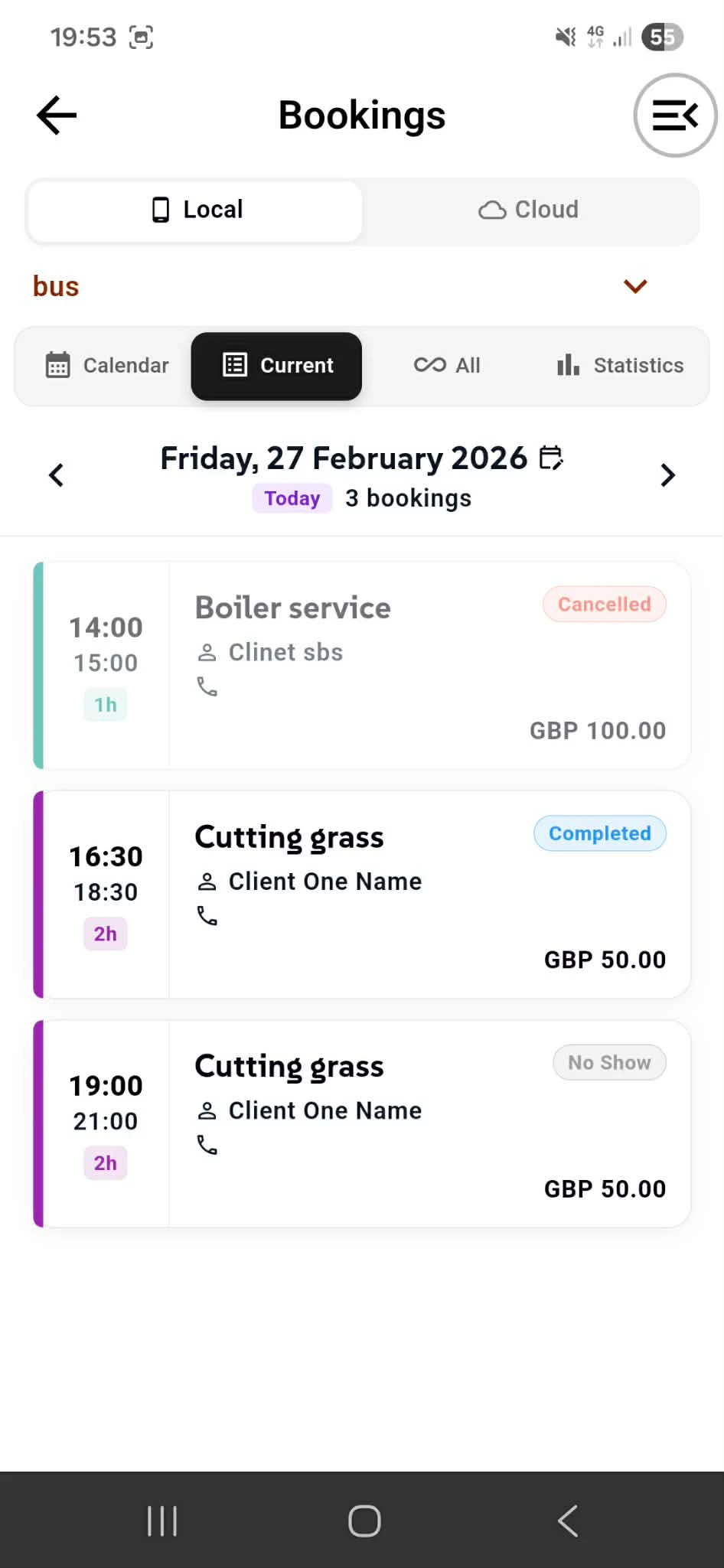
Switch to the Current tab to see all bookings for your selected day. View time slots, service names, client details, and pricing—everything you need at a glance. Status badges show each booking's state: Pending, Confirmed, Completed. Navigate between days using arrow buttons to see past and future schedules. Swipe any booking right to reveal quick actions: change status, edit details, or delete. No long menus. No hidden options. Just intuitive swipe controls that respect your time. Every booking shows exact time, client info, and service cost. Keep your day organized without leaving the screen.
Why This View Matters One Day, Complete Picture - See all bookings instantly. Nothing hidden.
Status at a Glance - Know if appointments are pending or confirmed.
Swipe to Control - Edit, delete, or change status in one motion.
Easy Navigation - Jump between days with arrow buttons.
Pricing Visibility - See revenue per booking. Track your day's earnings.
Your day. Your bookings. Your control. Current Day View.
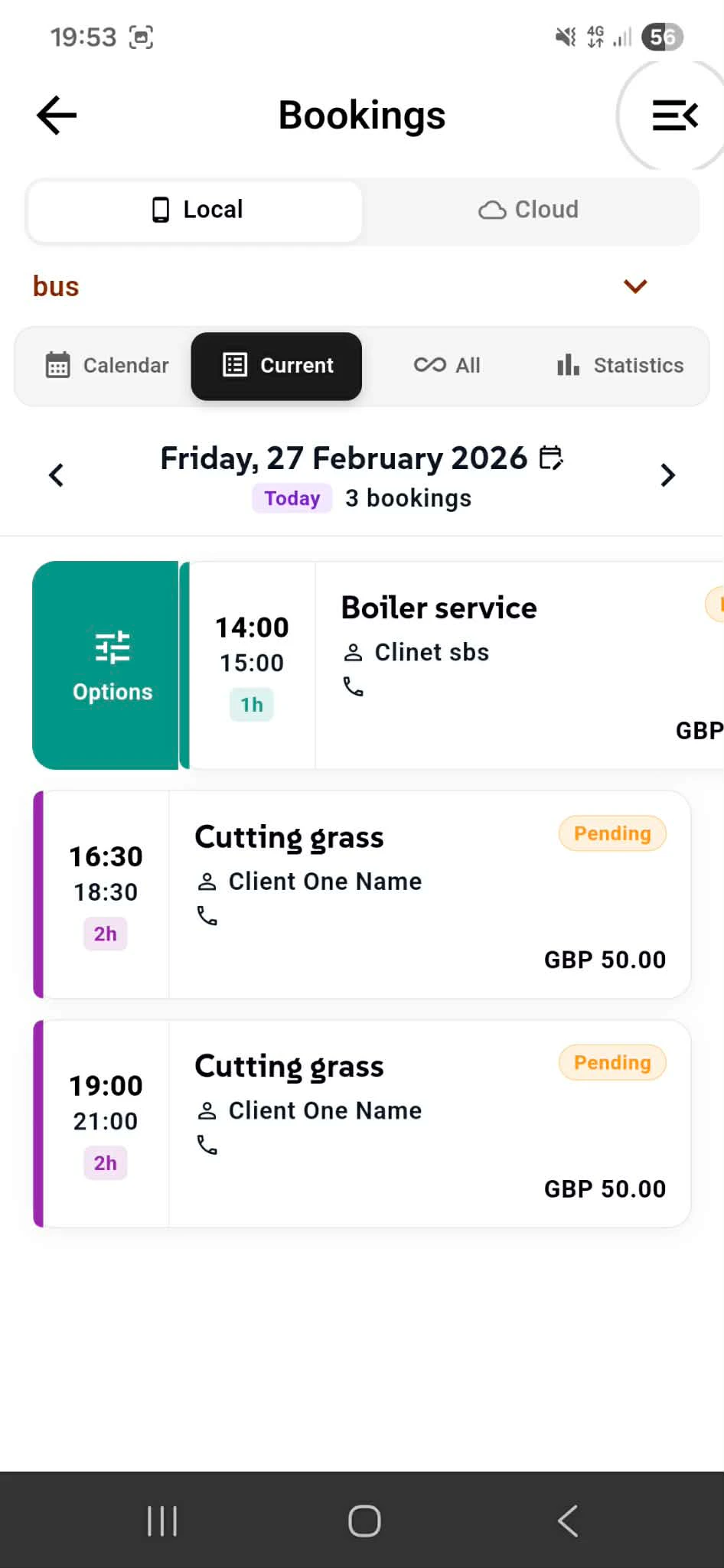
Change Status
Swipe any booking right to reveal status options. Tap to change from Pending → Completed → Cancelled → No Show. Status updates instantly. Your day's schedule reflects changes in real-time. No confirmations. No delays. Just fast, intuitive control.
Why It Matters Real-Time Updates - Status changes instantly. Calendar reflects immediately.
Visual Feedback - Color-coded badges show current state at a glance.
One Motion - Swipe and change. That's it.
Manage your day effortlessly. Change Status.
See Everything. Filter Anything.
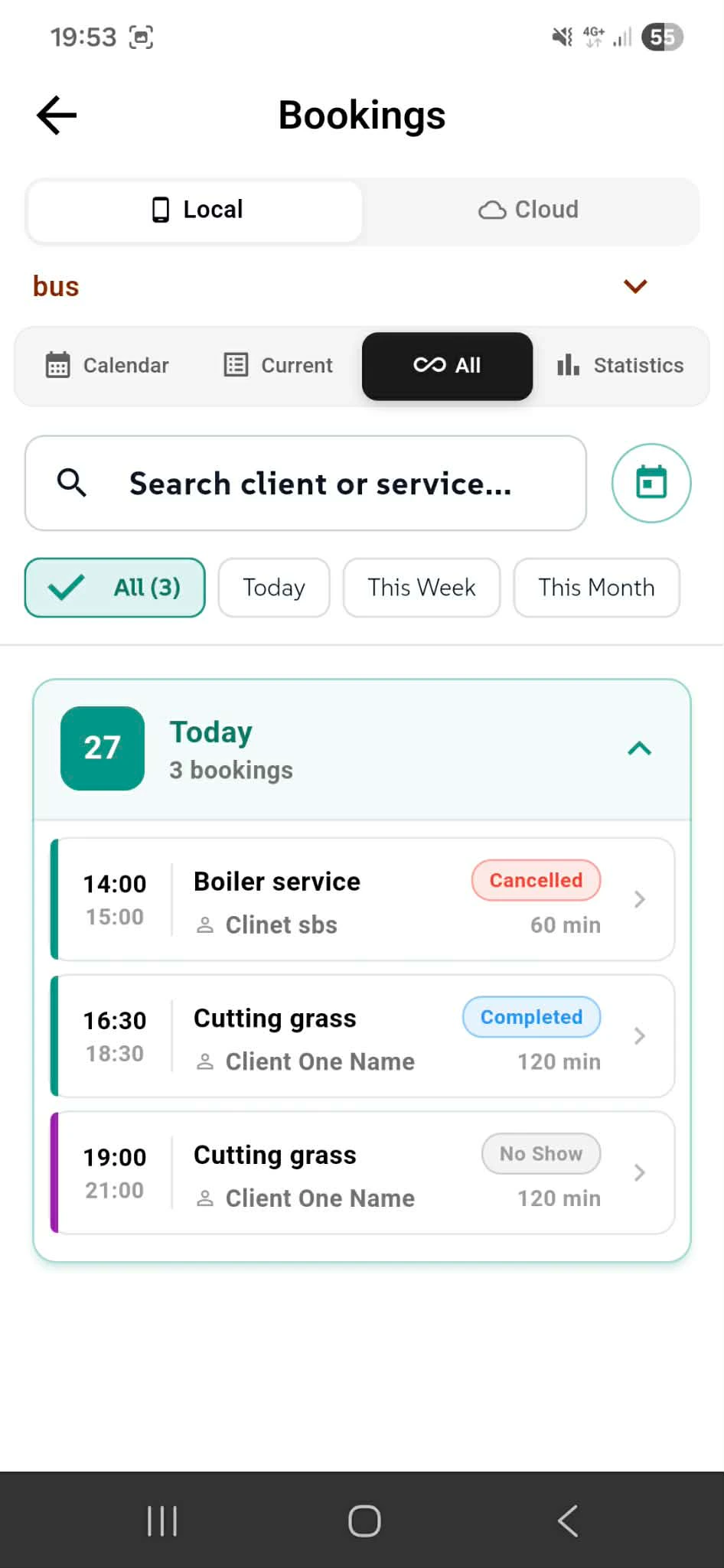
Switch to the All tab to view every booking organized by day groups. See all bookings instantly or filter by time period: Today, This Week, This Month, or All. Use the search bar to find bookings by client name or service type instantly. Each day shows a count of bookings and displays time, service, client, duration, and status badges. Collapse or expand day groups to organize your view. Keep your entire booking history accessible without losing focus on what matters most.
Why This View Matters Complete Visibility - See all bookings at once. Nothing hidden.
Smart Filtering - Jump to today, this week, or browse all history.
Fast Search - Find any booking by client or service name instantly.
Organized by Day - Bookings grouped logically. Easy to scan.
Status at a Glance - Every booking shows its current state immediately.
Your complete booking history in one view. All Bookings.
Delete with Confidence, Not Accidents
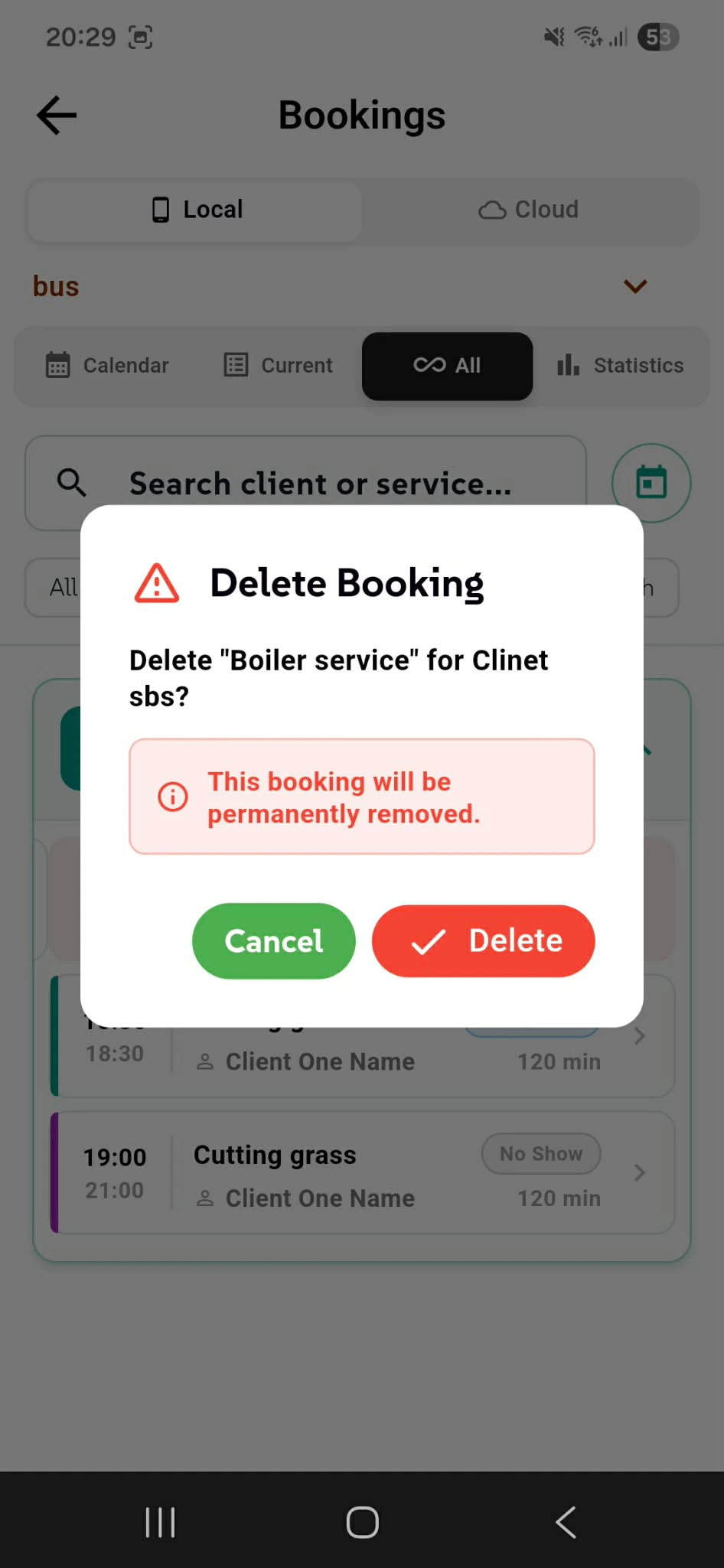
Swipe a booking left to delete. A confirmation dialog appears with the service name and client details, asking you to confirm. The warning message "This booking will be permanently removed" ensures you know what's about to happen. Tap Delete to confirm or Cancel to keep the booking. No accidental removals. No undo regrets.
Why Protection Matters Clear Confirmation - See exactly what you're deleting before it's gone.
One Tap Away from Safety - Cancel button always there if you change your mind.
No Hidden Surprises - Permanent removal warning shown upfront.
Delete with control. Delete Confirmation.
Unlock Booking Intelligence - Premium Only
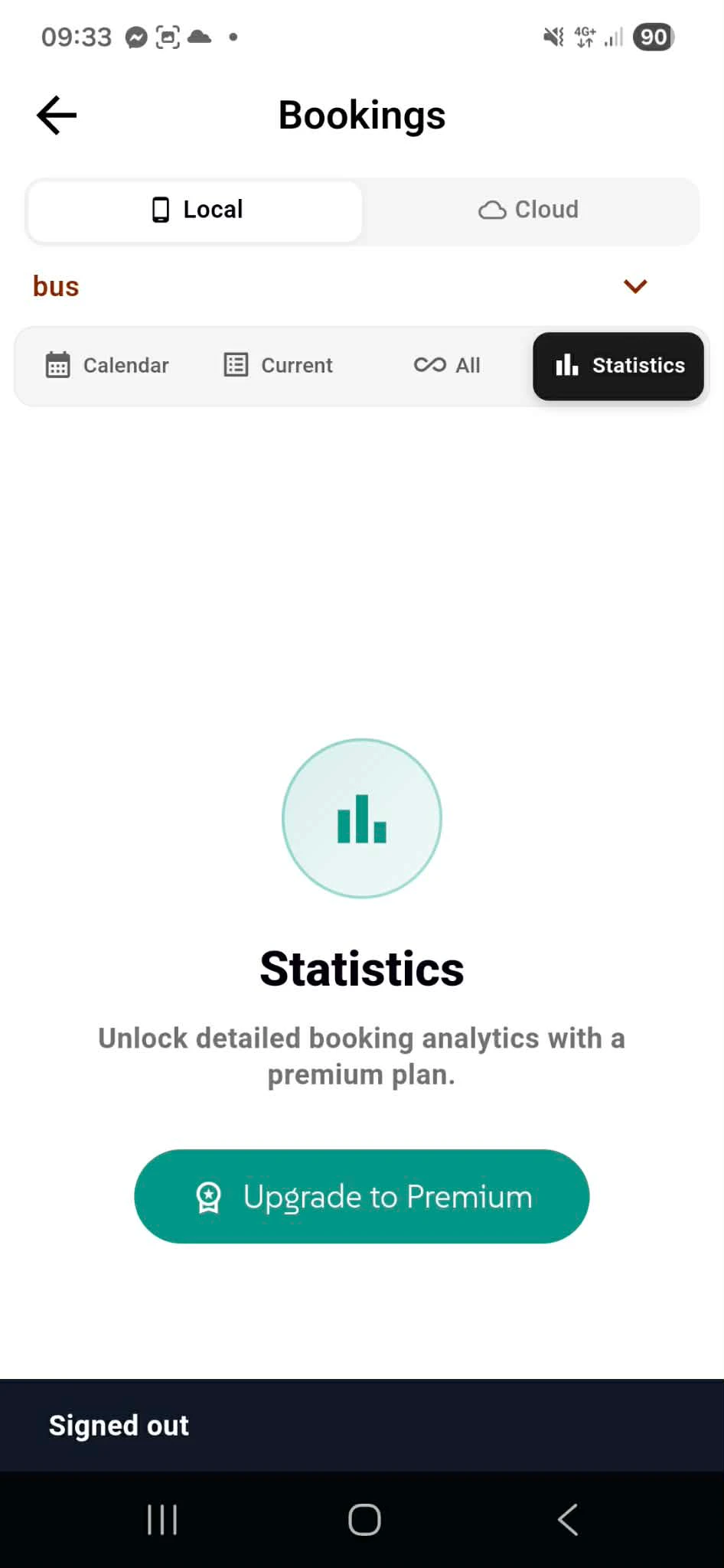
The Statistics tab is reserved for premium members. This is where detailed booking analytics live: revenue trends, service performance metrics, client booking patterns, and scheduling insights that help you optimize your business. Free users see the upgrade prompt with the option to unlock full analytics access. Tap Upgrade to Premium to activate complete booking statistics and gain detailed business intelligence for your bookings.
What Premium Unlocks Revenue Analytics - Track earnings by service, client, and time period.
Booking Trends - See which services book most frequently and when.
Performance Metrics - Identify your busiest days and top-performing services.
Data-Driven Decisions - Make smarter business choices based on real booking data.
Premium Access - All Local App features
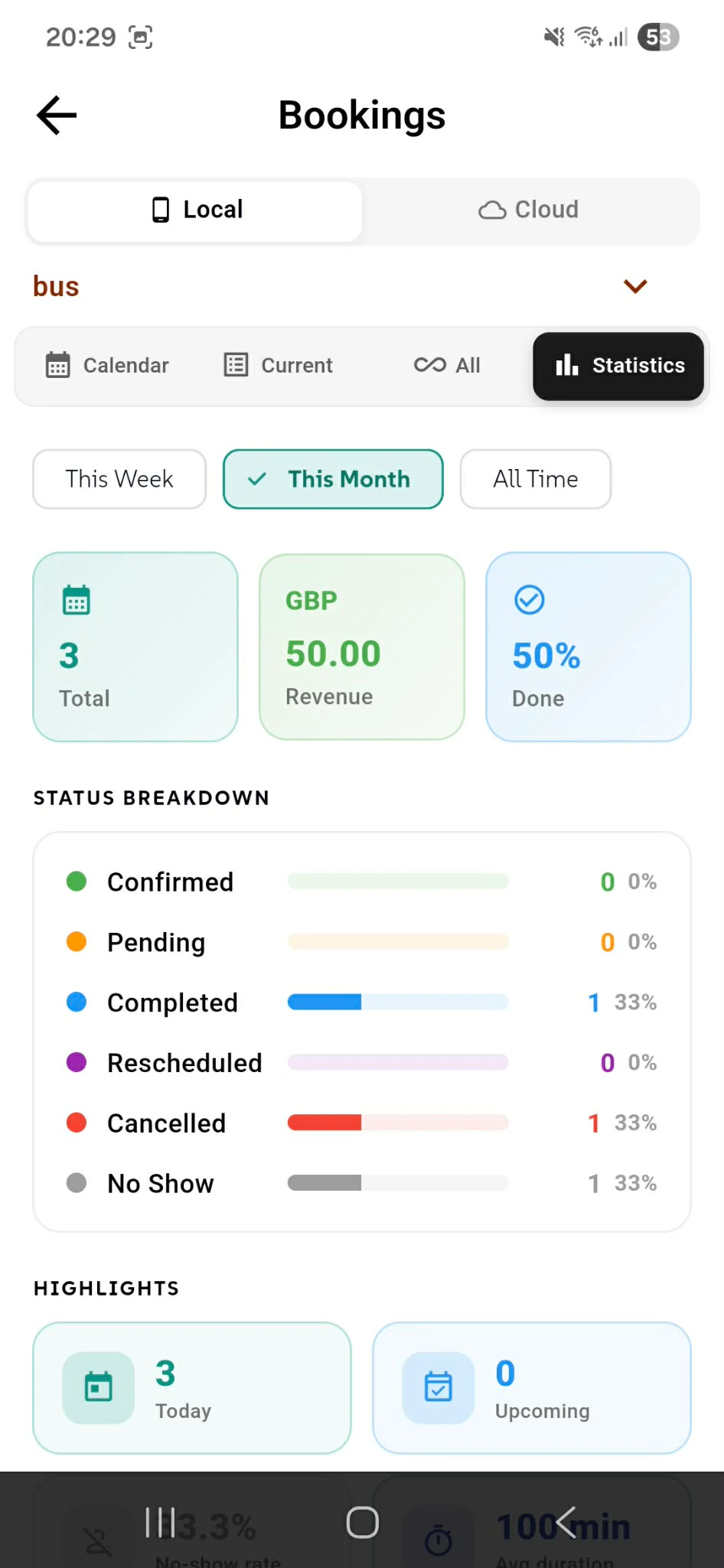
Your Business at a Glance - Premium Analytics
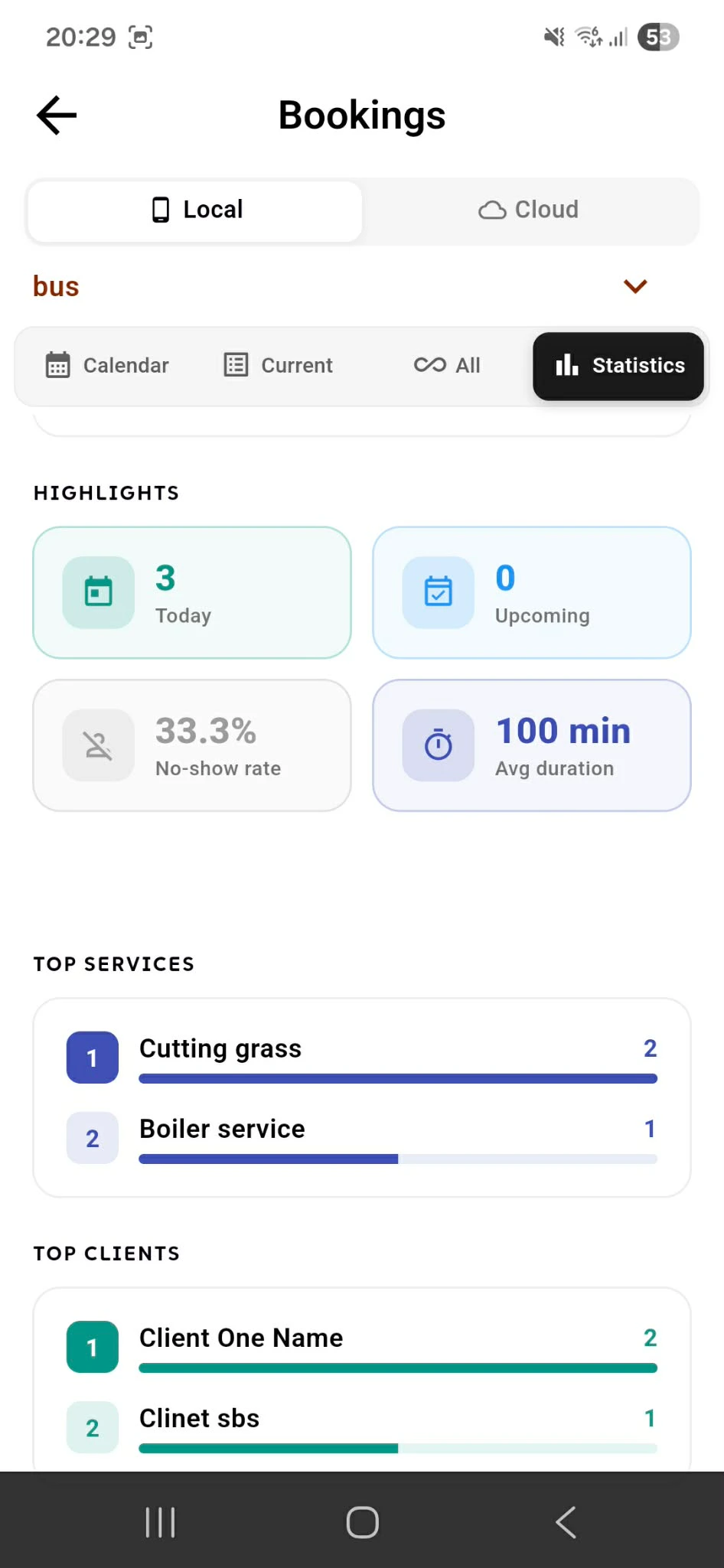
Premium members unlock complete booking statistics with actionable insights. Filter by time period (This Week, This Month, All Time) and see key metrics instantly: total bookings, revenue earned, and completion percentage. The Status Breakdown shows exactly how many bookings are Confirmed, Pending, Completed, Rescheduled, Cancelled, or No Show—with color-coded bars for quick visual scanning. See what percentage of bookings are in each status. The Highlights section displays today's booking count and upcoming appointments, keeping your current schedule visible. All data updates in real-time as you create, edit, or complete bookings. Make smarter business decisions with complete booking intelligence right at your fingertips.
Why Premium Analytics Matter Revenue Tracking - Know exactly how much you've earned this month.
Status Intelligence - See completion rates and problem areas instantly.
Time-Based Insights - Compare performance across weeks, months, or all-time.
Visual Clarity - Color-coded metrics make patterns obvious.
Quick Highlights - Today's bookings and upcoming appointments always visible.
Data-driven business management. Premium Analytics.
Smart Insights in Real-Time
The Top Services section ranks your most-booked offerings with booking counts—see that "Cutting grass" leads with 2 bookings. The Top Clients section shows your best clients by booking frequency—who's booking most and how many times. All data updates in real-time as bookings complete. Identify your revenue drivers and loyal clients instantly.
Why This Matters Performance at a Glance - See what's working immediately.
Client Loyalty Tracking - Know your best customers by booking count.
Service Ranking - Identify top performers and underperformers.